Haldar AI product

HAI Accounting, our own cloud accounting software.

Books, stock, GST and an AI that reads them. Built, shipped and run by our own team.

modules
9modules
reports
32reports
ledger accounts
79ledger accounts
haldar-accounting.vercel.appDashboard
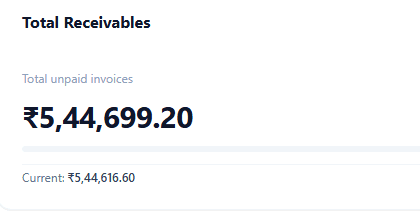
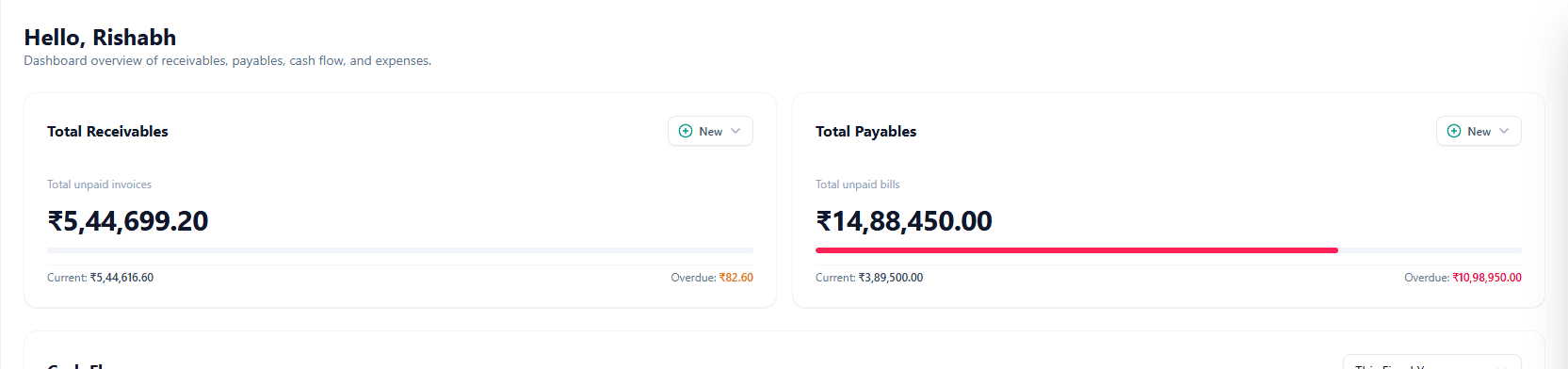
The receivables card in HAI Accounting showing total unpaid invoices of 5,44,699.20 rupees

Nine screens, one system underneath.

This is the whole product, in the order a business meets it. Every image is the running app.

haldar-accounting.vercel.app
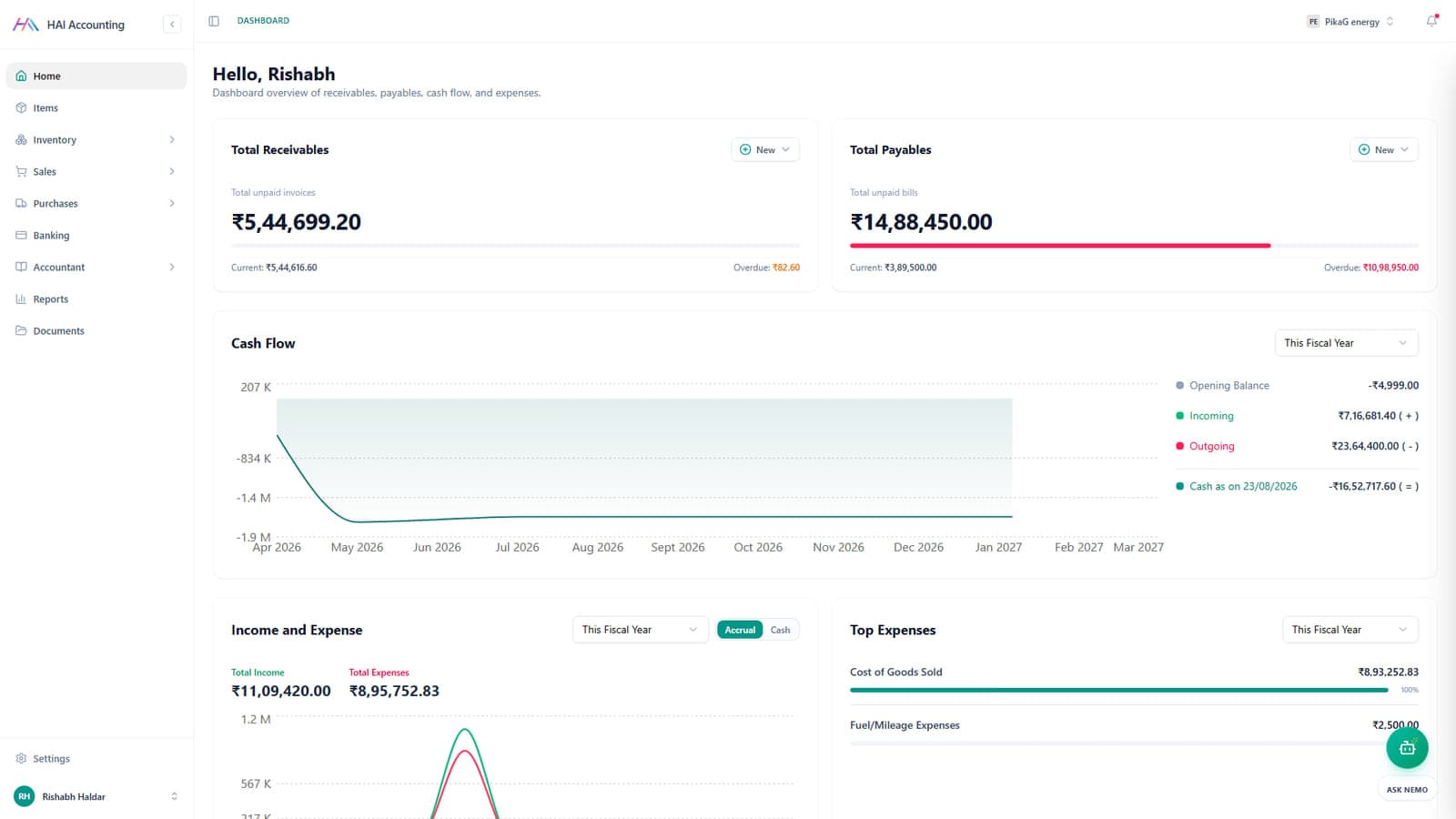
HAI Accounting dashboard showing receivables, payables, cash flow and top expenses

Dashboard

Open it, and the month is already counted.

What you are owed, what you owe, and what the year looks like from here. Nobody has to build a report to answer the first question of the day.

  • Unpaid invoices and unpaid bills together, split into current and overdue
  • Cash flow plotted across the whole fiscal year
  • Income against expense, on an accrual or a cash basis
  • Top expenses ranked by the account they landed in
haldar-accounting.vercel.app
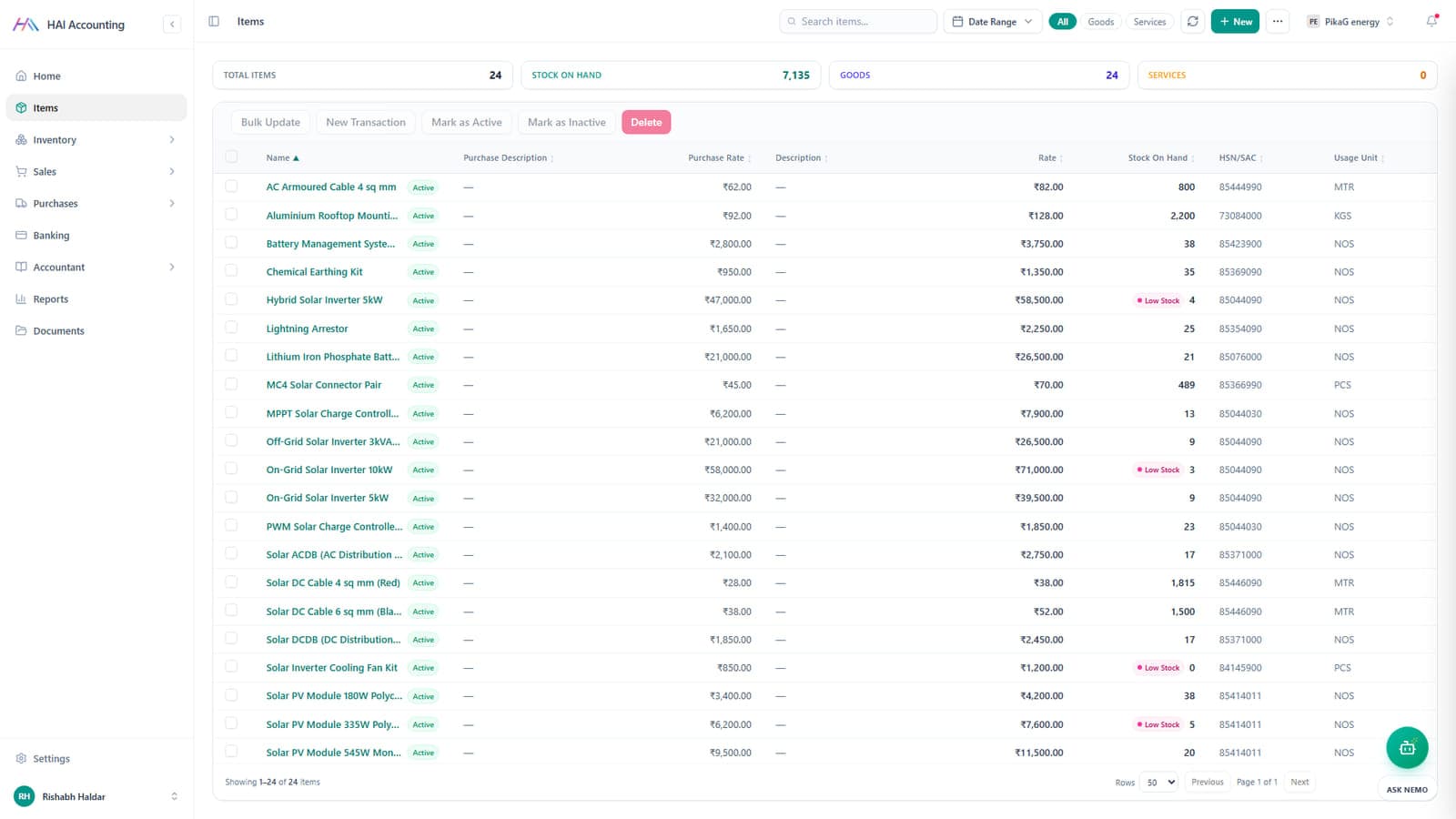
HAI Accounting item catalogue with HSN codes, rates and stock on hand

Items

One catalogue sits behind every document.

Goods and services live in a single list with their tax codes, both rates and the live stock count. Every quote, invoice and purchase order pulls from it.

  • HSN and SAC codes on the item, so GST is right at the source
  • Separate purchase rate and selling rate on the same record
  • Stock on hand with low stock flags and usage units
  • Bulk update and CSV import for catalogues you already have
haldar-accounting.vercel.app
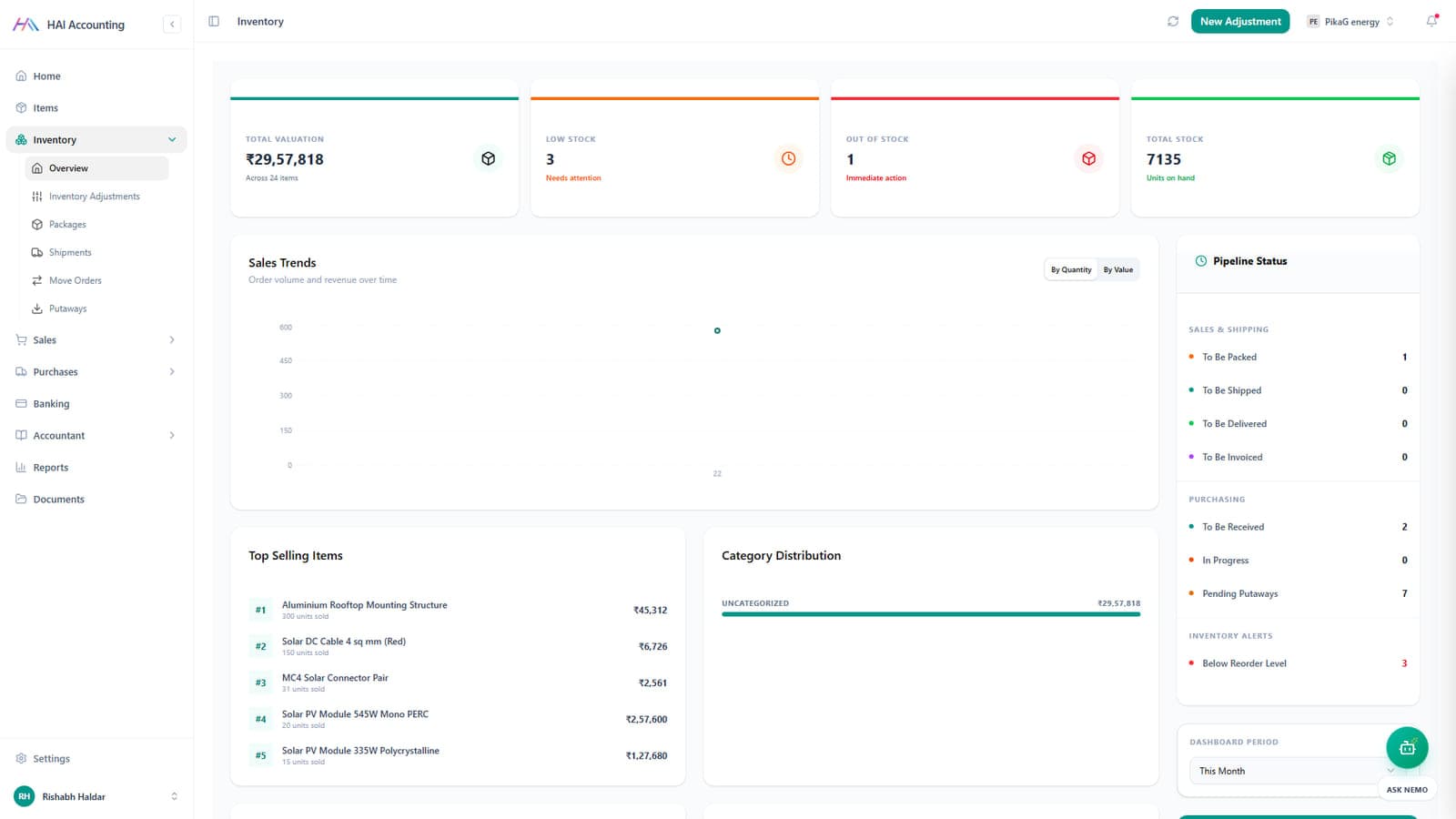
HAI Accounting inventory overview with valuation, sales trends and pipeline status

Inventory

Stock moves when the paperwork moves.

Valuation, reorder alerts and the packing pipeline stay in step with sales and purchases, because the same documents drive all three.

  • Total valuation, low stock and out of stock across the catalogue
  • Pipeline status: to be packed, shipped, delivered, invoiced
  • Adjustments, move orders, packages, shipments and putaways
  • Below reorder level alerts, per item, per warehouse
haldar-accounting.vercel.app
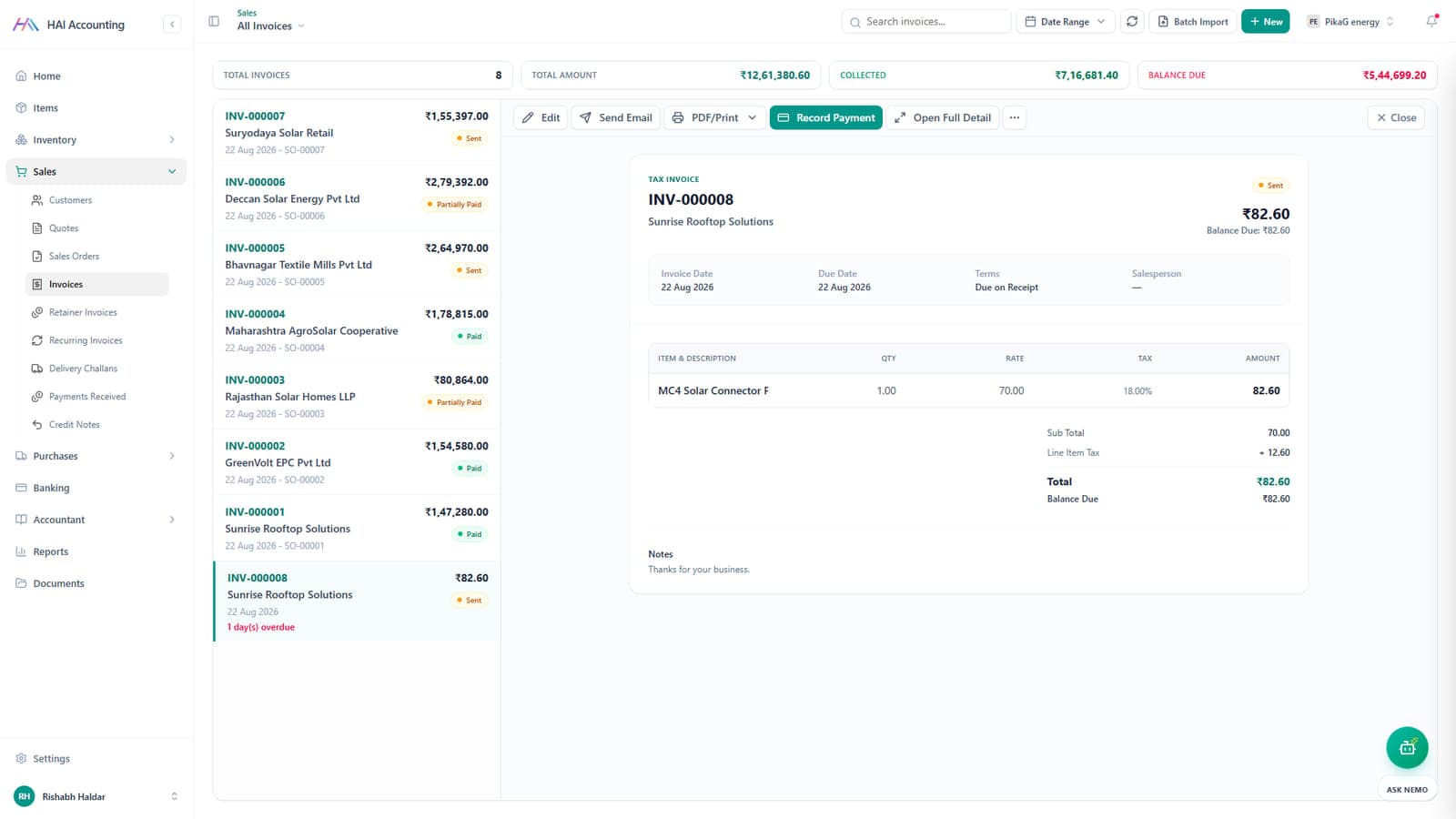
HAI Accounting invoice list with a tax invoice open beside it

Sales and invoicing

Quote, order, invoice, payment. In that order.

The sales side runs as one chain. Each document carries into the next, so nobody retypes a line item and nothing falls between two spreadsheets.

  • Quotes, sales orders, invoices, delivery challans and credit notes
  • Retainer and recurring invoices for the clients who repeat
  • Record a payment, email the PDF or print it from the same row
  • Totals, collected and balance due across the whole list
haldar-accounting.vercel.app
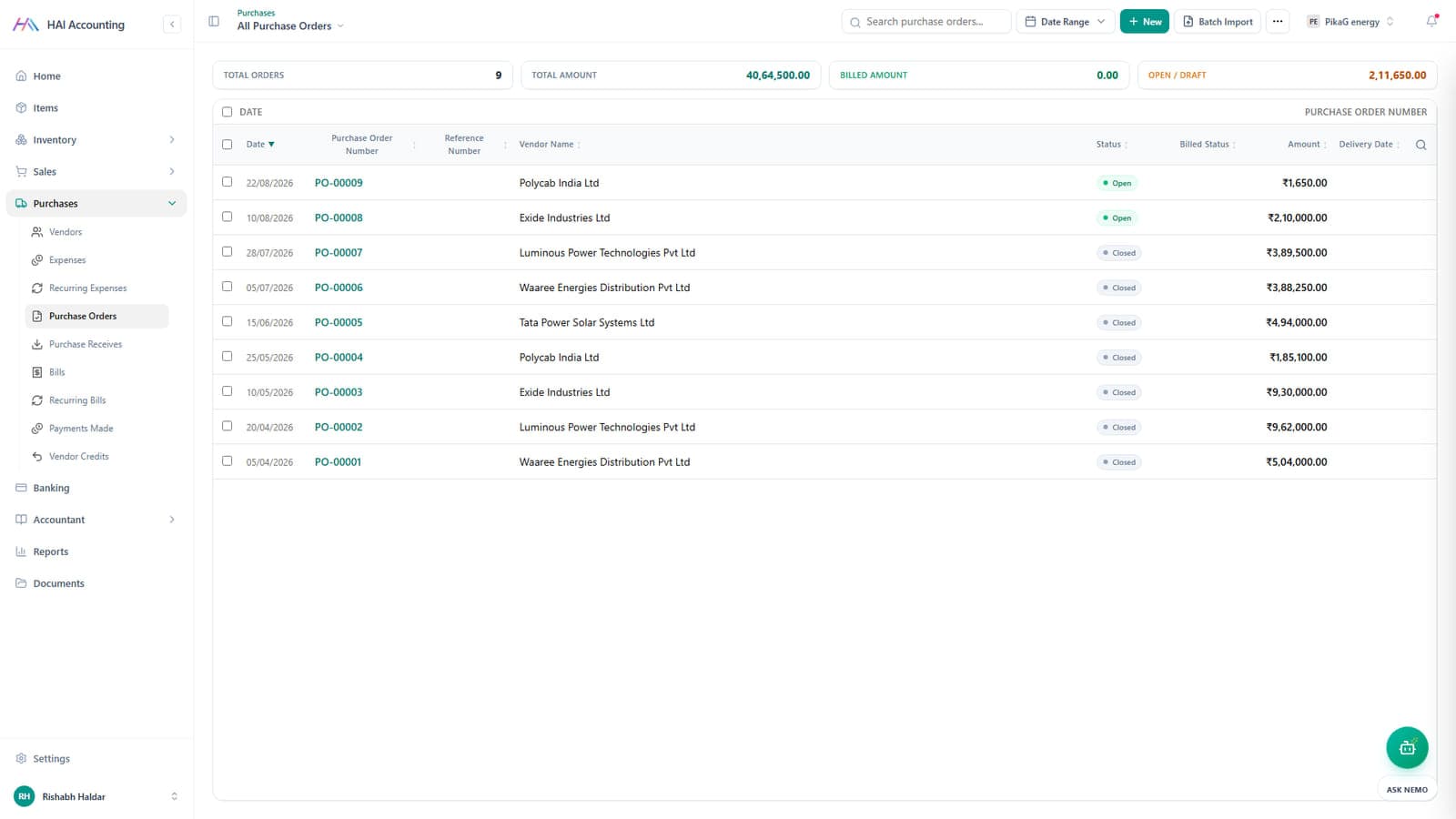
HAI Accounting purchase order list with vendors, status and amounts

Purchases

The other half of the ledger.

Vendors, purchase orders, receives and bills. Stock and average cost update when goods actually arrive, not when someone remembers.

  • Purchase orders with open, closed and billed status
  • Purchase receives that update stock on hand and average cost
  • Bills, recurring bills, expenses and vendor credits
  • Payments made, recorded against the right bill
haldar-accounting.vercel.app
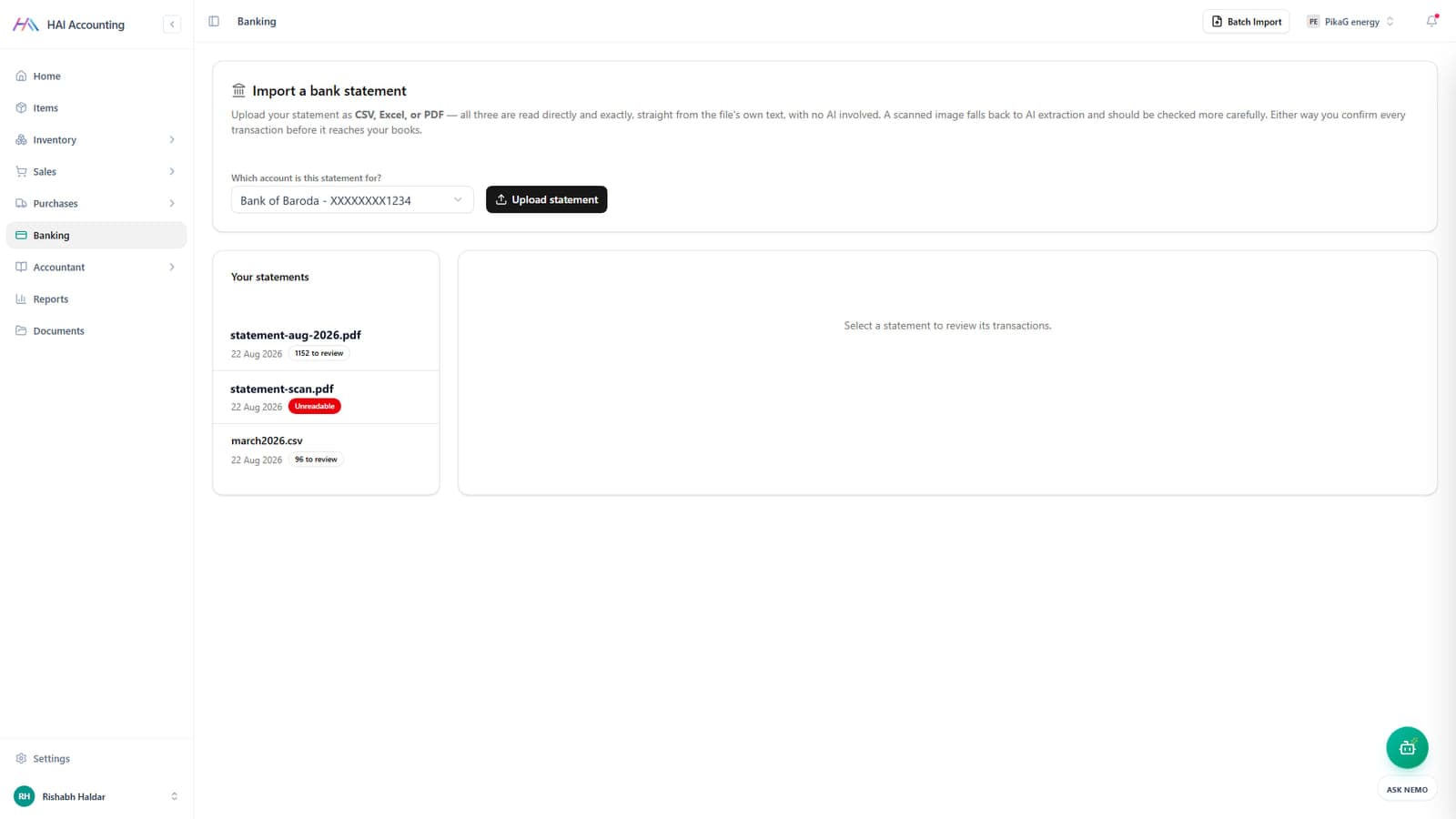
HAI Accounting bank statement import screen with queued statements

Banking

Your statement, read exactly as written.

CSV, Excel and PDF are read straight from the file's own text, with no AI in the path. A scanned image falls back to extraction and is flagged for a closer look. You confirm every transaction before it reaches the books.

  • Import a statement as CSV, Excel or PDF
  • Over a thousand transactions queued from a single file
  • Unreadable scans are marked as unreadable, not guessed at
  • Rules to categorise the ones that repeat every month
haldar-accounting.vercel.app
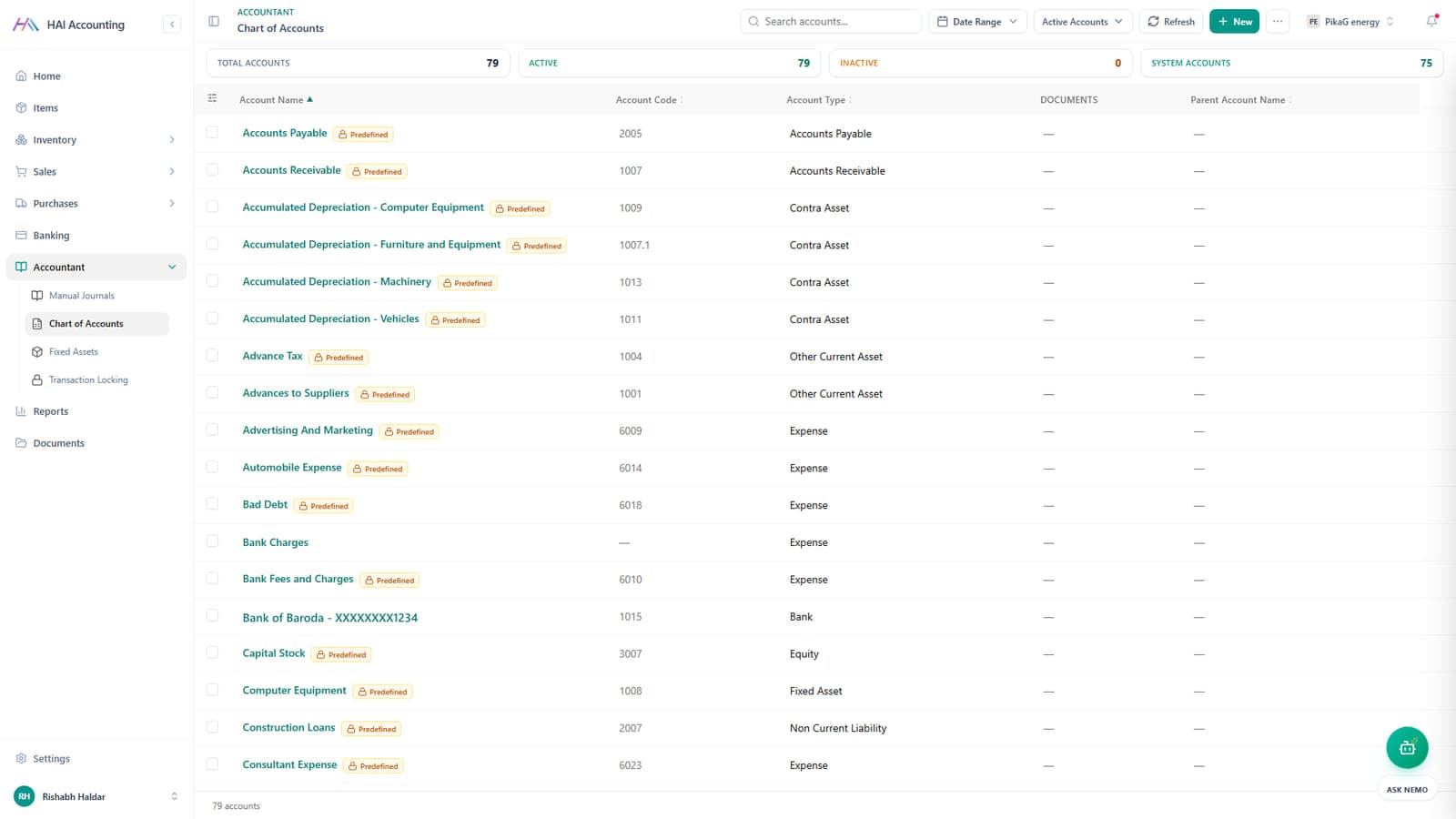
HAI Accounting chart of accounts with account codes, types and predefined tags

Accountant

The part your CA asks for.

A full chart of accounts ships ready on the first day, with journals, fixed assets and a lock on periods that are closed.

  • 79 accounts out of the box, 75 of them predefined
  • Account codes, account types and parent accounts
  • Manual journal entries, with import for the bulk ones
  • Fixed assets, currency adjustments and transaction locking
haldar-accounting.vercel.app
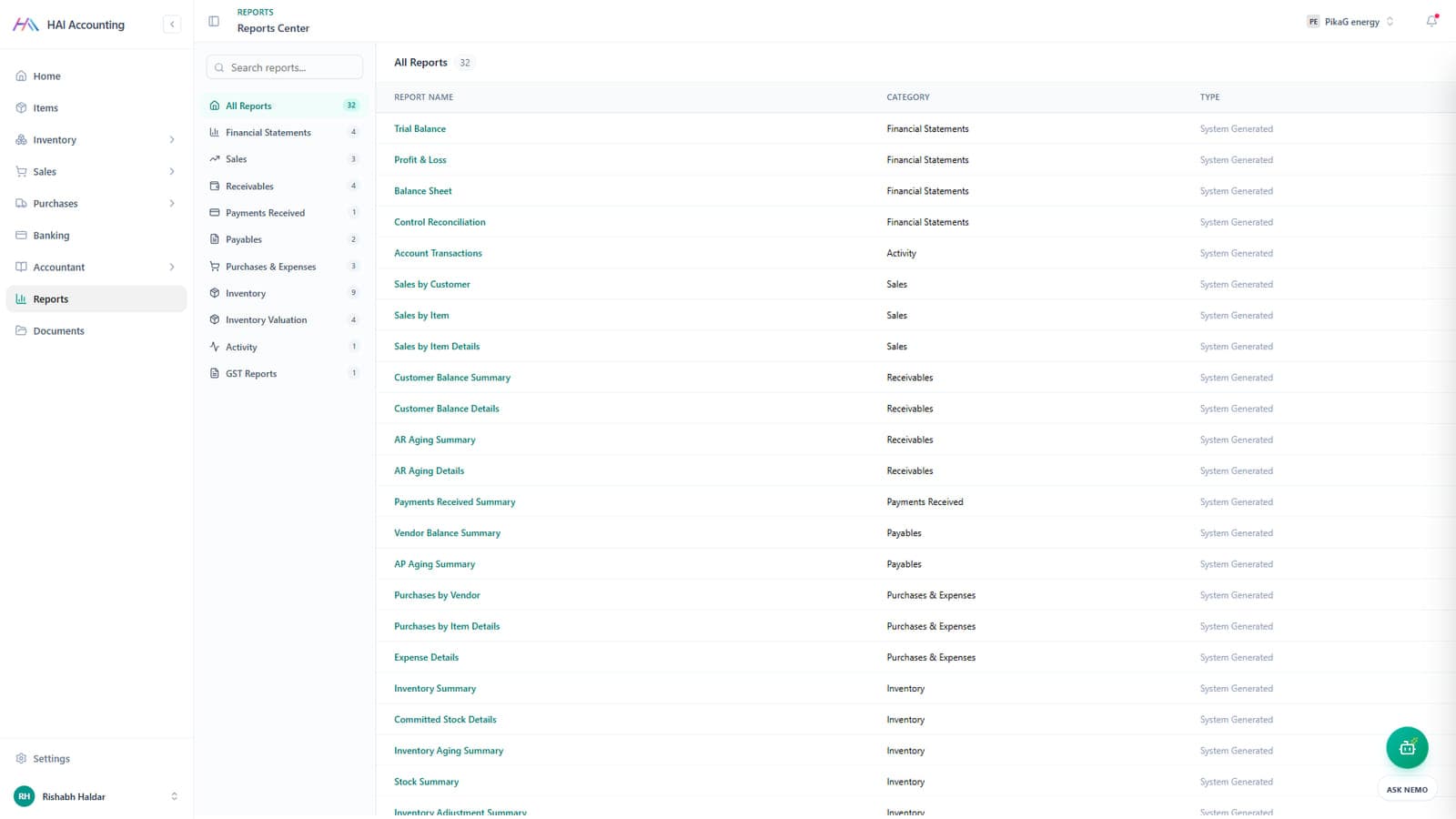
HAI Accounting reports centre listing 32 system generated reports

Reports

32 reports, already written.

Trial balance, profit and loss, balance sheet and GST sit in the same place as ageing, inventory valuation and sales by item. No spreadsheet export required.

  • Financial statements: trial balance, profit and loss, balance sheet
  • Receivables and payables ageing, in summary and in detail
  • Inventory valuation, stock summary and committed stock
  • GST reports for filing
haldar-accounting.vercel.app
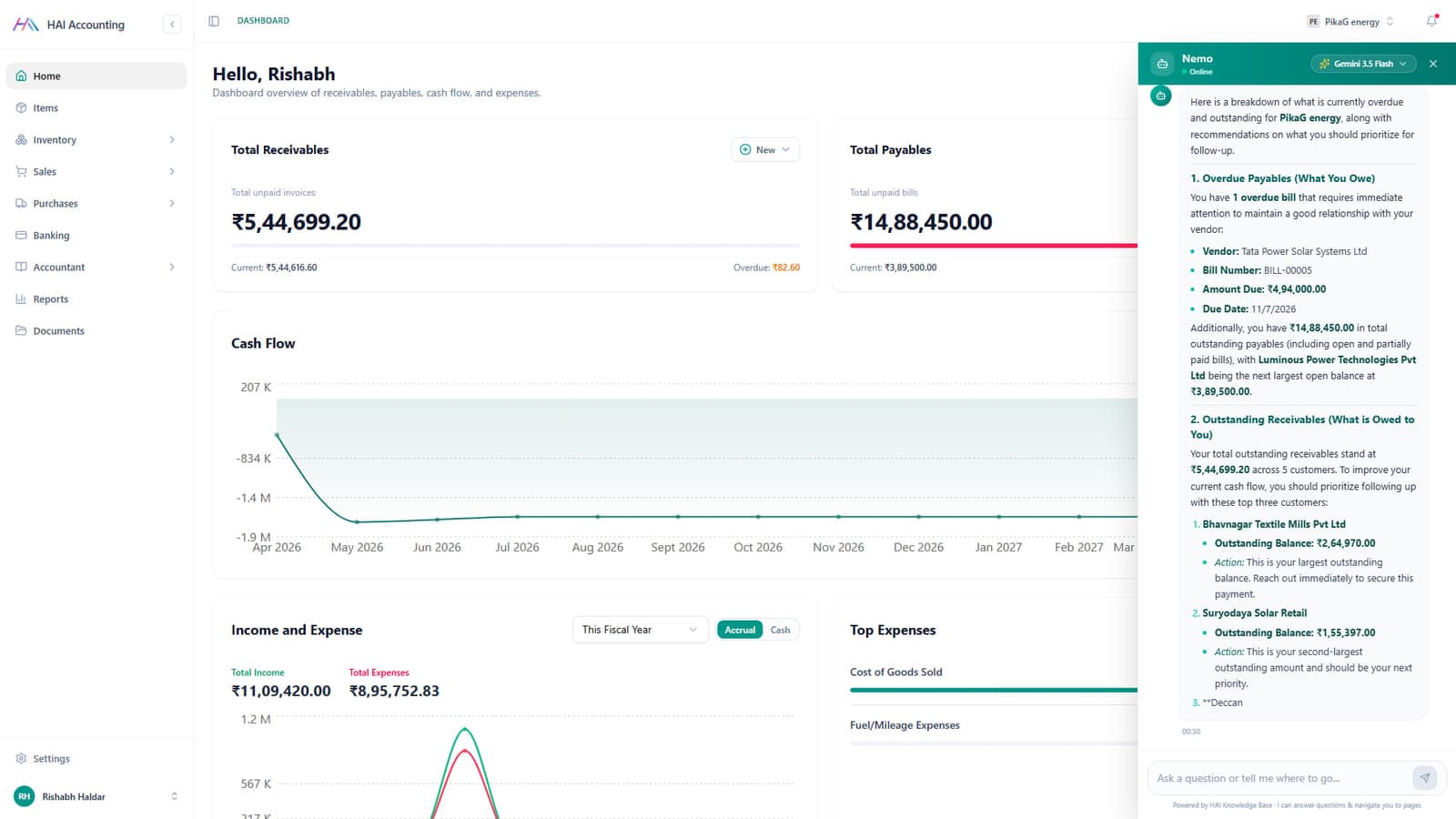
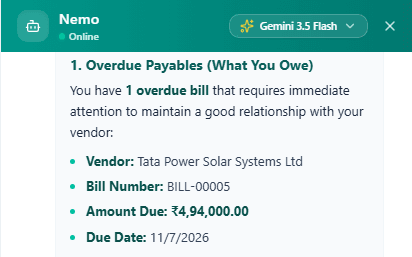
The Nemo assistant answering a question about overdue payables inside HAI Accounting

Ask Nemo

An assistant that has actually read your books.

Nemo answers in plain English from your own ledger: what is overdue, who to chase first, what it adds up to. Then it takes you to the screen where you can act on it.

  • Grounded in your own records through vector search, not a generic model
  • Names the vendor, the bill number, the amount and the due date
  • Ranks receivables by who is worth following up first
  • Navigates you to the right page when you ask where something is

Eight modules, one ledger underneath.

Nothing here is a separate app bolted on. A sale, a purchase, a stock move and a bank line all post into the same chart of accounts, which is why the reports agree with each other. Pick a module to trace what it feeds.

One document becomes the next.

Most small businesses lose money in the gaps between a quote, a delivery and an invoice. Here each step carries the last one forward, and the stock and the ledger move with it.

When you sell

  1. Quote

    Price it and send it.

    Nothing hits the ledger yet

  2. Sales order

    They said yes.

    Stock is committed, packing starts

  3. Invoice

    Bill it with tax.

    Receivable created, GST recorded

  4. Payment

    Money in.

    Receivable cleared, cash updated

When you buy

  1. Purchase order

    Order from the vendor.

    Shown as incoming stock

  2. Receive

    Goods arrive.

    Stock on hand and average cost update

  3. Bill

    Vendor bills you.

    Payable created

  4. Payment made

    Money out.

    Payable cleared, bank balance moves

Ask in plain English. It answers from your books.

Nemo searches your records before it says anything, so the answer comes back with the vendor, the bill number, the amount and the date on it. Then it offers to take you to the screen where you can act.

What is overdue right now?
Who should I follow up with first?
How much stock is below reorder level?
Take me to last month's bills

Where we leave the AI out

Bank statements are parsed straight from the file’s own text. CSV, Excel and PDF go through no model at all, a scanned image is flagged as needing a second look, and you confirm every transaction before it reaches the ledger. Books are not the place for a good guess.

haldar-accounting.vercel.app
The Nemo assistant answering a question about overdue payables inside HAI Accounting
Nemo, answering from live records

Product and service

We built this the way we build for clients.

HAI Accounting is not a demo. It is a multi tenant product with authentication, roles, money documents, inventory, reporting and an AI layer, in production and under maintenance. When a founder in the USA asks whether we can build their SaaS, this is the answer we send.

SaaS platformsInternal tools and dashboardsE-commerceMobile appsAI assistants over your own dataIntegrations and migrations
Front end
Next.js App Router, TypeScript, Tailwind, TanStack Query and Table
Back end
Express and TypeScript, MongoDB with Mongoose
Auth
Firebase: Google, email, phone OTP and magic link
AI
Gemini embeddings with vector search over your own records
Scale
Multi organisation, multi currency, multi warehouse
Money in
PayU checkout, customer portal, payment reminders
Paperwork
PDF and print, batch import, document storage per record
Control
Audit comments on records, transaction locking on closed periods

Questions people actually ask us.

Can we run HAI Accounting for our own business?

Yes. Tell us how you invoice, what you stock and who needs access, and we set up your organisation, your chart of accounts and your opening balances. Talk to us and we will walk you through the live app first.

Is it ready for GST?

HSN and SAC codes sit on the item, tax is applied per line on the invoice, and GST reports are in the reports centre alongside the financial statements.

Can you build a product like this for us?

That is what SaaS product development means here. HAI Accounting is our own proof: multi tenant data, roles, billing documents, reporting, PDF generation and an AI layer, all shipped and running. We build the same for clients in India, the USA and Dubai.

What happens to the data we already have?

Customers, vendors, items, invoices and the chart of accounts all import from CSV, and bank history comes in as CSV, Excel or PDF statements. You review before anything is committed.

Where does the data live?

In a MongoDB database, with Firebase handling sign in. For clients who need it on their own infrastructure, we deploy the same stack into your cloud account.

How is the AI different from a chatbot bolted on?

Nemo reads your records through vector search before it answers, so it quotes your bill numbers, vendors and balances. The bank import deliberately does the opposite: statement text is parsed exactly, with no model in the path.

Want this running on your books?

Tell us how you invoice and what you stock. A developer, not a sales script, replies within 24 hours, and we will show you the live app first.

No spam, no obligation. Response within 24 hours.